Missive + WooCommerce · Upcase Pro
Your WooCommerce orders, in the Missive sidebar.
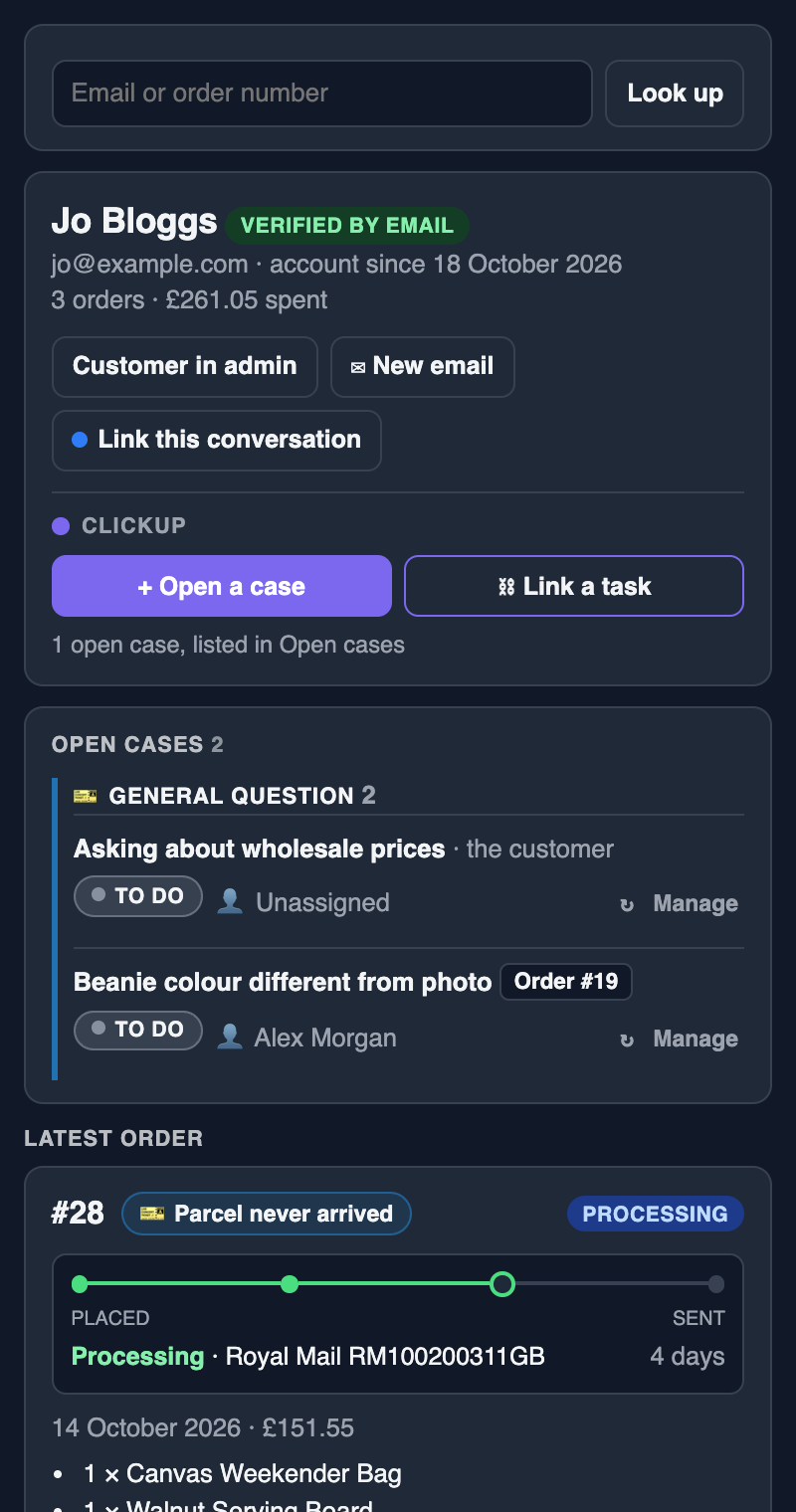
Open an email or chat in Missive and see who it's from: their orders, reships and every ClickUp case. Open a case that quotes the message in a couple of clicks, without leaving the conversation.
Built for, and used every day by, a UK online shop's support team
The problem
Every reply starts with a search.
A customer emails about a parcel. Before anyone can answer, someone opens WooCommerce, searches for their address, finds the right order, checks the tracking, then opens ClickUp to see whether there's already a case. Multiply that by every conversation, every day.
With Upcase, all of that is already beside the message when you open it.
What it does
Answer, open a case, reship and reorder, all from Missive.
Who's writing
The customer behind each email, matched by address, with their account, order count and lifetime spend. Your own team's replies are never mistaken for the customer.
Their orders
The latest order with a delivery tracker, earlier orders a click away, and reships on their way.
Cases that quote the conversation
Tick the messages to quote and the files to attach, add a screenshot, pick a person and a list, and the ClickUp task is created with all of it.
Link the conversation
Link a conversation to an order or the customer. The next person to open the order sees it, with a link that jumps straight back to it in Missive.
Reship from the inbox
The whole order or chosen items, with a complimentary extra and a reason, quietly or with a "reship requested" email, waiting for approval before it's packed.
Reorder in a few clicks
Reorder, or start a new order with their details. Check the items over and it's made as Pending payment: nothing is charged, emailed or taken from stock until it's paid.
Email the payment link
Any order waiting for payment, including a reship's postage, has a button that sends the customer the link again, whenever they ask for it.
Cases beside each order
An order's open cases show next to its number, and every case says which order it's for. Click either to jump straight there.
Verified live chat
Missive's live chat on your shop. Signed-in customers show as verified; guests are marked unverified and their orders stay hidden until you're sure who they are.
Set up in minutes
Three steps, no code.
Make your sidebar link
In WordPress, open your profile and press Make my sidebar link. Each member of staff has their own, private to them.
Add it to Missive
In Missive, Settings → Integrations → Add integration → iFrame, and paste the link. The sidebar appears beside every conversation.
Add a Missive API token
Optional, and recommended: with it, the sidebar quotes messages into cases and attaches the conversation's files.
Your conversations stay yours
Missive messages never reach us. Your shop reads them from Missive and sends what you choose to quote on to your ClickUp. All we ever see is a daily licence check. Read the privacy policy.
Questions
Missive and Upcase.
How does it connect to Missive?
As a Missive iFrame integration. Each member of staff makes a private sidebar link from their WordPress profile and adds it in Missive. An optional Missive API token lets the sidebar quote messages and attach the conversation's files.
Do Missive messages pass through your servers?
No. Your shop reads them from Missive and sends them on to your ClickUp. We never see them.
Does it work with Missive live chat?
Yes. Upcase can add Missive's live chat to your shop and sign in customers who are logged in, so Missive shows them as verified. It works on headless shops too, with a few lines on your storefront.
What if a customer emails from a different address?
Look them up by any email address or order number from the sidebar's search box, then link the conversation to their order so it's found next time.
Which plan do I need?
Pro or Agency. The 14-day free trial includes it, with no card needed.
Try it in your own Missive.
Upcase Pro is £199 a year per store, or £20 a month. The 14-day trial includes everything.