Integrations · Upcase Pro
Brilliant customer service, without the tab-switching.
Your team answers customers in their inbox, but the answers live in WooCommerce and ClickUp. Upcase Pro brings the two to every conversation: the customer's orders, reships and cases, right beside the message, so every reply is quick, informed and frustration-free.
Used every day by the support team of a UK online shop
How it fits together
WooCommerce and ClickUp at the centre. Every conversation connected.
Wherever a customer gets in touch, your team sees the same picture: the orders from WooCommerce and the cases from ClickUp, joined by Upcase. No hunting, no copying and pasting, no "let me check and get back to you".
Where you work
One sidebar, wherever your team talks to customers.
A customer writes in about an order. Normally that means a second tab, a search in WooCommerce, then a third tab for ClickUp. With Upcase, the answer is already beside the message.
Missive
The customer behind every email and chat, with their orders and cases. Quote messages into cases, attach the conversation's files and link it to an order.
The Missive sidebar LiveGmail
The same sidebar in Chrome's side panel, beside the email you have open, in personal Gmail or Google Workspace. Also beside your WooCommerce orders list.
Gmail and WooCommerce LiveWhatsApp Web
The customer behind each chat, found by phone number however it was typed on their order. Quote the chat into a case or reship from it.
WhatsApp and WooCommerce Every planClickUp, on every order
The foundation: open ClickUp cases from any WooCommerce order, filled from the order, and see their status back on the order.
ClickUp for WooCommerceThe sidebar
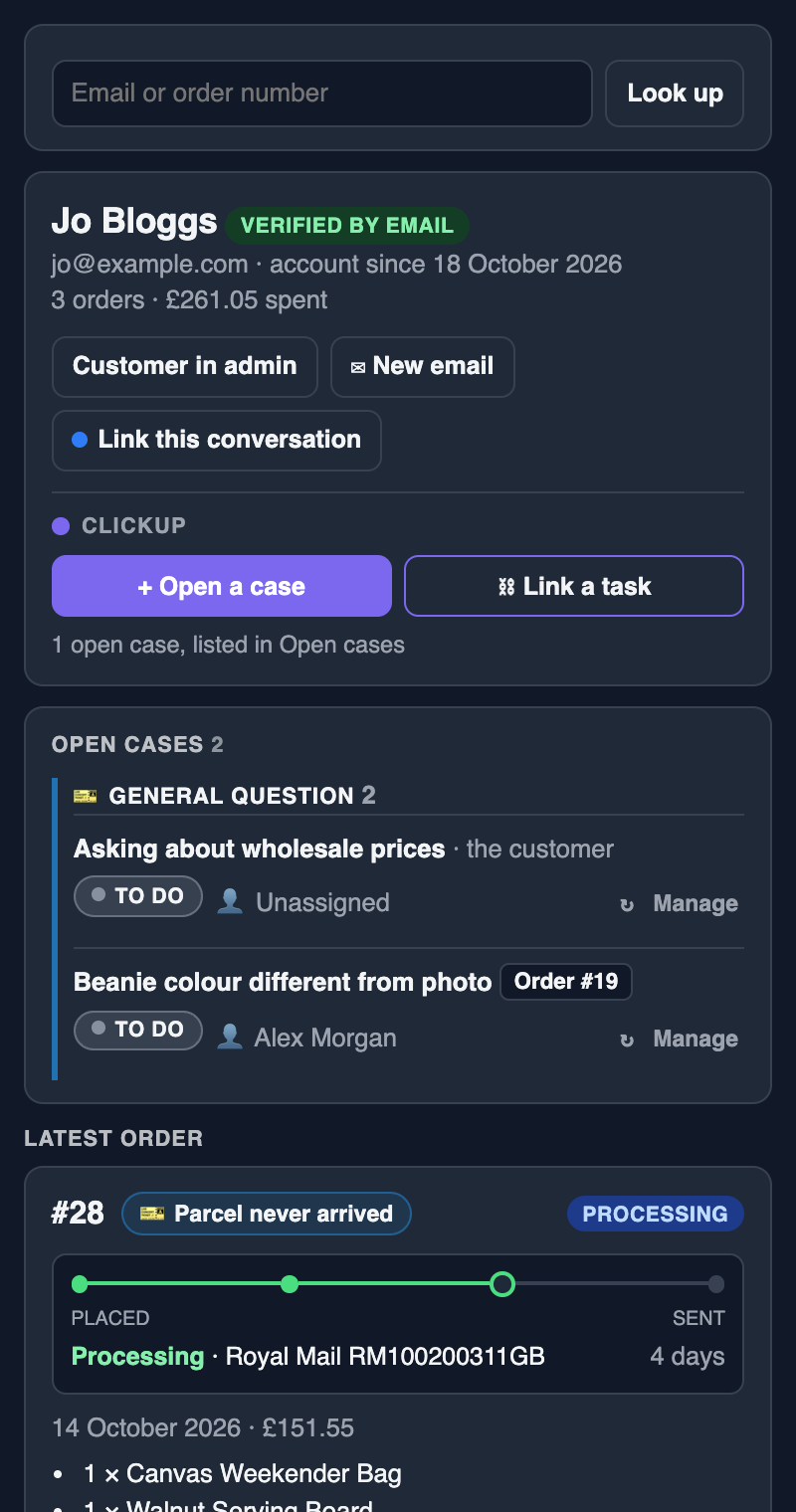
Everything about the customer, without leaving the conversation.
Open a message and the sidebar shows who it's from. Everything the team does from there lands in your ClickUp and your WooCommerce orders.
- Who they areMatched by email address or phone number, with their account, order count and spend. Chats from signed-in customers show as verified.
- Their orders and reshipsThe latest order with its tracking, earlier orders a click away, and reships on their way. Each order shows its open cases right beside its number.
- Every case, and a new one in secondsOpen cases grouped by type. Open a case that quotes the message, link an existing task, or change one's status and assignee.
- Reship from the conversationThe whole order or chosen items, with a complimentary extra, waiting for approval before anything is packed.
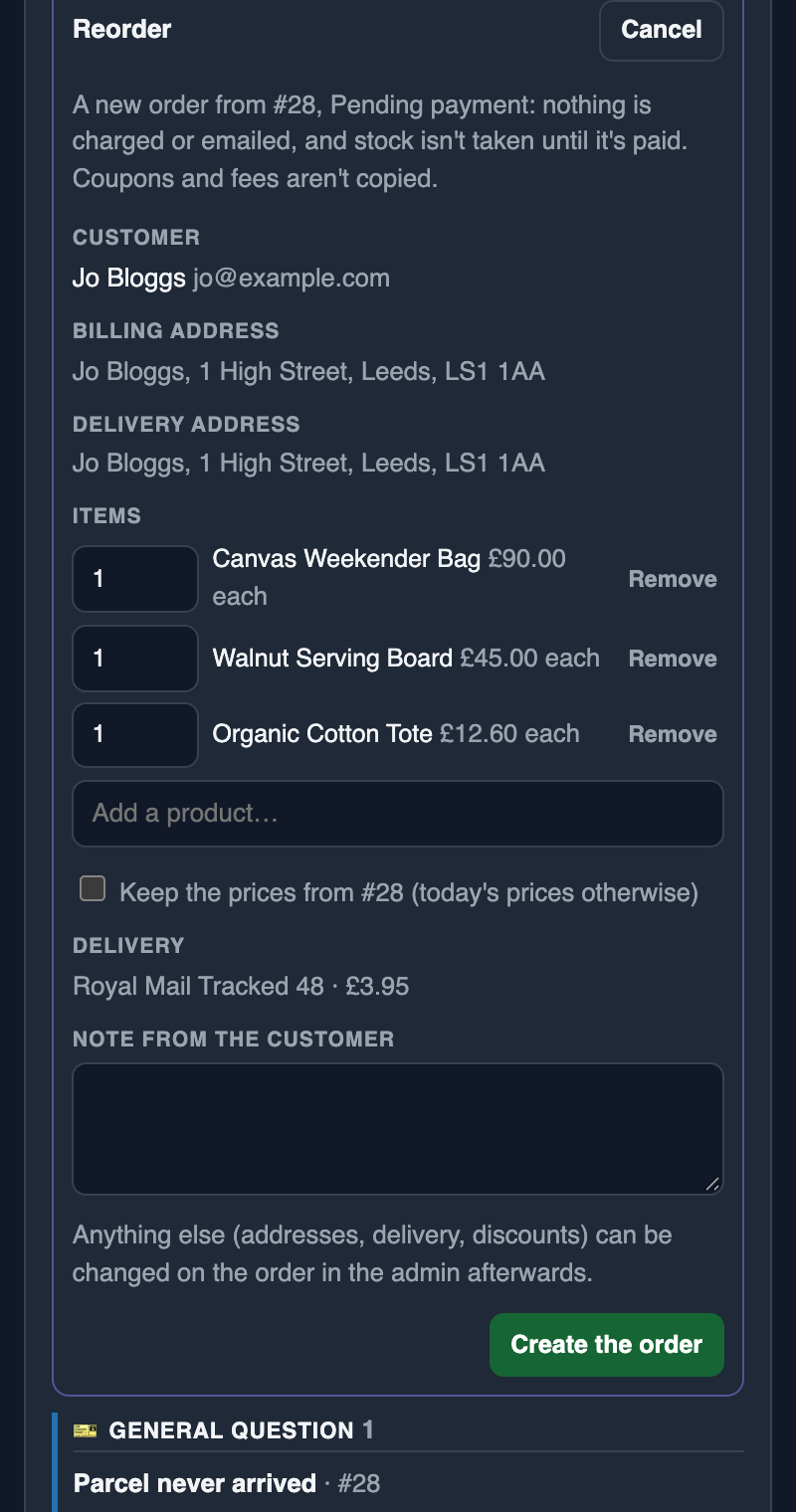
- Reorder in a few clicks"Same again, please?" Check the items over and it's made as Pending payment. Email the payment link from the same place.
Reorders
"Can I have the same again?" Sorted from the inbox.
Press Reorder… on any of their orders, check the items, and the order is made as Pending payment. Nothing is charged, emailed or taken from stock until they pay, and Email the payment link sends them WooCommerce's own payment email whenever they ask for it.
Also in Pro
Cases that open, and orders that update, by themselves.
Automatic rules
Refunds, failed payments, cancellations, orders stuck on hold, customer notes and high-value orders can open a case on their own.
Status actions
Move a task to a status in ClickUp and WooCommerce acts: create a free replacement order, or complete the order with the tracking number.
Verified live chat
Missive's live chat on your shop, with signed-in customers marked as verified, so you know who you're talking to before sharing order details.
Private by design
Your customers' messages never reach us. The sidebar runs on your own shop: messages go from Missive, Gmail or WhatsApp to your WooCommerce, and from there to your ClickUp. All we ever see is a daily licence check: your licence key, your site's address and the version numbers. Read the privacy policy.
Questions
Good to know.
Which integrations are in Upcase Pro?
Missive, and Gmail, WhatsApp Web and your WooCommerce orders list with the Upcase Chrome extension (free from the Chrome Web Store; it uses your shop's Pro licence). Pro also includes automatic rules, ClickUp status actions and verified live chat.
Do my customers' messages go through your servers?
No. Messages go from Missive, Gmail or WhatsApp to your own WooCommerce shop, and from there to your ClickUp. We never see them.
Does everyone on the team need a licence?
No. Pro is licensed per store, not per person. Each member of staff makes their own sidebar link from their WordPress profile, and it shows only what they're allowed to see.
Do I need Missive?
No. The same sidebar works in Missive or, with the Chrome extension, beside Gmail, WhatsApp Web or any page. Use whichever suits your team.
Can I try it first?
Yes. The 14-day free trial includes every Pro feature, with no card needed. Staging copies of your shop are always free.
Give your team the whole picture.
Upcase Pro is £199 a year per store, or £20 a month, with every integration included. Try it free for 14 days.